Tech · Oct 29, 2026 · 5 min read
MacBook Pro PROLED XDR + Touch: first impressions
What early hands-ons say about Apple’s first touch MacBook Pro — tandem OLED, Dynamic Island, no Pencil, and whether the premium is worth it.
By Mark
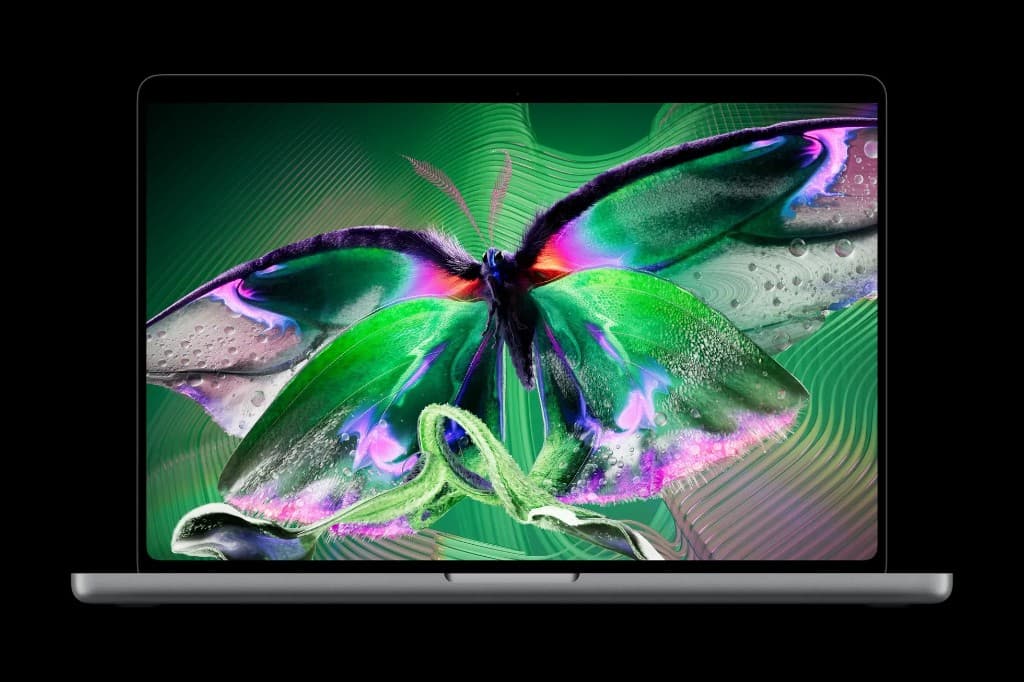
Apple finally did the thing Steve Jobs spent years arguing against: put a finger-friendly display on a MacBook. The new MacBook Pro with PROLED XDR Display is the first Mac that treats the screen as something you can poke, pinch, and scrub — not just stare at through a trackpad.
This is not a long-term review. Pre-orders opened October 28; units start shipping around November 6. What follows is a synthesis of Apple’s own claims and the early floor demos from outlets that got short hands-on time — useful if you’re deciding whether to wait, upgrade, or keep your M3/M4 Pro.
What actually shipped
Skip the marketing fog. The hardware story breaks into four pieces:
| Piece | What you get |
|---|---|
| Display | Tandem OLED “PROLED XDR,” up to 2,000 nits peak HDR, claimed 10,000,000:1 contrast, ProMotion up to 120Hz, wide gamut covering P3 and Adobe RGB |
| Input | Capacitive Touch built into the panel (not a thick overlay), plus the usual keyboard and trackpad |
| Design | Slightly thinner chassis, roughly 3 lb (14") / 4 lb (16"), Dynamic Island instead of the old notch, glowing Apple logo is back |
| Silicon | M5 Pro and M5 Max, with high-end configs that go deep on unified memory and storage |
Apple also quotes up to 24 hours of battery life. Treat that as a lab ceiling until independent drain tests land.
US starting prices land around $2,899 (14") and $3,399 (16") — roughly a $400 bump over similarly equipped non-touch Pros in the current lineup. That premium is the real decision, not the press photos.
The display is the headline
Almost every early write-up agrees on one point: the panel is the reason to care.
Previous Pros used Mini-LED with local dimming. That was already excellent for a laptop. Tandem OLED changes the feel — true blacks, punchier HDR highlights, and color that reads more like a reference monitor than a notebook lid. Reviewers who got camera-close to the glass kept describing the same reaction: turn the brightness down for video, because HDR looks aggressively bright under event lighting.
If you grade photos, cut video, or live in design tools all day, this is the upgrade path that actually moves the needle. If you mostly write docs and hop Zoom calls, Mini-LED Pros already looked fine — you’re buying OLED vanity plus Touch at that point.
Touch on a Mac, without pretending it’s an iPad
Apple did not ship a convertible. The hinge still opens like a normal laptop. There is no Apple Pencil support. You cannot fold this into a tablet and sketch like an iPad Pro.
What you can do, based on demo time:
- Swipe and pinch on maps, photos, and timelines
- Drag files between apps
- Finger-draw in illustration apps (fine for roughing ideas; not a Pencil replacement)
- Scrub video, spin 3D models, play on-screen instruments in demos
- Flick windows to tile; double-tap to fill the screen
- Tap Dynamic Island for Live Activities / playback controls
macOS also tries to fix the classic “fat finger on tiny chrome” problem. Traffic-light window buttons and some menus enlarge when you aim a finger at them. Un-updated third-party apps still fall back to tap-as-click, which means fiddly targets will stay fiddly until developers ship touch-aware layouts.
The honest early consensus: Touch feels polished for Apple’s own apps and a shortlist of partners (Notion, Canva, Office, Lightroom, and similar were named in demos). It does not reinvent how most people will work. Trackpad muscle memory still wins for precision. Touch is the “reach up and nudge the timeline” feature, not a new OS.
Small design wins people noticed
- Dynamic Island on Mac replaces the camera notch. Music, brightness, and volume HUD elements migrate there — same idea as iPhone, smaller footprint than the old black bar.
- Weight is the other surprise on the 16-inch. Carrying a four-pound Pro after living with a heavier chassis is the kind of change you feel in a bag, not in a benchmark chart.
- Hinge stiffness got a bump because tapping glass will bounce a soft lid. Early notes still say firm taps near the top can wobble the screen — better, not magical.
Who should pre-order vs wait
Pre-order if you edit color-critical work, you want the best Mac display Apple sells, and $400 over a non-touch Pro does not sting.
Wait if you need real battery numbers, hinge durability chatter, and third-party app maturity. Floor demos hide fingerprint grease, burn-in anxiety, and whether Touch becomes a habit or a novelty after week two.
Skip for now if your current Pro is fast enough and you already own an iPad for finger/Pencil work. Buying this machine only for Touch is a weak reason — Apple left Pencil on the table on purpose.
We covered the pre-event rumor cycle in Apple may finally ship a touchscreen MacBook Pro. That piece aged into a yes; this one is about what the first demos actually felt like.
FAQ
Is PROLED just marketing speak for OLED?
Basically yes — Apple’s name for its tandem OLED stack with the XDR brightness and contrast claims. The tandem design is why they can push high sustained brightness without the panel cooking itself as quickly as a single-layer OLED.
Can I use Apple Pencil on it?
No. Apple confirmed capacitive finger input only. A passive stylus might register as a finger; you will not get Pencil Pro features.
Will older MacBook Pros get Touch via a software update?
No. Touch needs the panel hardware. Software can only improve trackpad and accessibility on older machines.
Is this replacing every MacBook Pro?
Not from the early pricing and positioning. It reads as a premium OLED + Touch variant sitting above the non-touch Pros, not a forced upgrade for every buyer.
Bottom line
First impressions cluster around a clear split: the PROLED XDR panel is the star; Touch is a well-finished bonus that stops short of iPad territory. Pay the premium for the display if your work lives in pixels. Do not expect the finger glass alone to justify the jump — and wait for longer reviews before you retire a perfectly good M-series Pro.